Booking a Flexible Workspace Stay in Oristano: 10 Guest Checks
A flexible workspace can be a very good short-stay solution in Oristano, but only if you define “good” before you book.
Most disappointments come from vague listing language. “Good for remote work” can mean anything from a proper desk with reliable internet to a spare chair near a hallway router. The practical question is simpler: will this setup support the work you actually need to do, for the hours you actually need to work, without turning every call into a workaround?
This guide is built for travelers, not office managers. If you are staying in Oristano and need a room, guesthouse, or shared workspace that can handle email, video calls, focused writing, planning, or light client work, the goal is to make the decision with less guesswork. I focus on the useful criteria: internet reliability, desk fit, quiet, power, timing, and the small comfort items that make the difference between “possible” and “pleasant.”
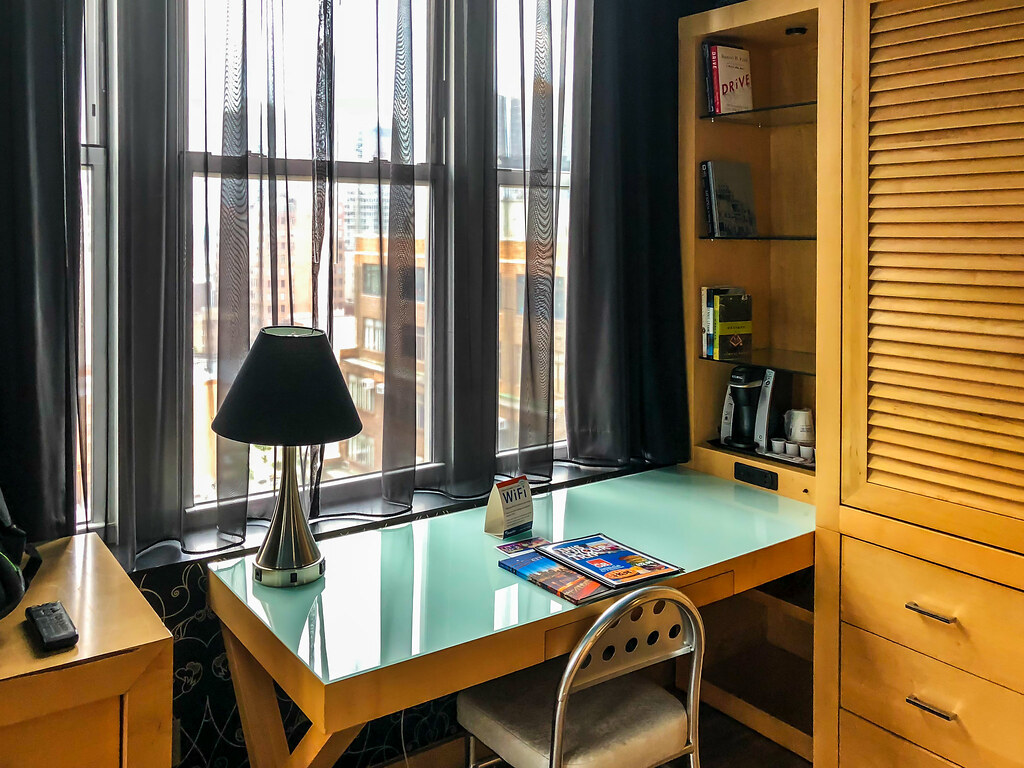
If you are still comparing stay options, the main Eleonora Bed and Breakfast home page gives you a starting point for the property itself, while the About page, Contact page, and Support page are the right places to confirm practical details before arrival.
What “Flexible Workspace” Usually Means for Travelers
For a traveler, a flexible workspace usually does not mean a full coworking membership with phone booths, printers, lockers, and staffed reception. It usually means one of three things:
- A guest room with a desk or table that can double as a work surface.
- A shared common area where laptops are welcome during certain hours.
- A nearby café, lounge, or day-use workspace that fills the gaps left by the room itself.
The important distinction is this: flexible describes options, not quality. You may have more than one place to sit, but still not have the quiet, outlets, upload speed, or call privacy that serious work requires.
| What it often includes | What it does not automatically guarantee |
|---|---|
| Desk, table, or counter space | Enough surface area for a laptop, notebook, mouse, and drink |
| Property Wi-Fi | Stable upload speed or low-latency video calls |
| Shared lounge access | Quiet during peak breakfast or check-in hours |
| Power outlets nearby | Outlets positioned where your charger actually reaches |
| “Remote work friendly” language in a listing | A setup that matches your own working style |
That is why pre-booking questions matter. The better your criteria, the less likely you are to improvise from the edge of a bed while balancing your laptop like a bad life choice.
Before You Book: 10 Questions to Ask
Before committing, ask the host or property manager the same practical questions you would ask yourself if you were setting up a temporary office. A clear answer is usually a good sign. A vague answer is a useful answer too.
| Question | Why it matters | Reasonable default | Watch for |
|---|---|---|---|
| 1. Is the Wi-Fi stable in the exact room or area where I would work? | A fast connection in the hallway is not the same as a stable one at your desk. | Host confirms the specific room or common area, not just “Wi-Fi available.” | Answers that only mention the router or the building, not your working spot. |
| 2. Do you know the typical download, upload, or video-call performance? | Email tolerates weak internet; meetings do not. | A host who can share a rough speed test or at least confirm regular video calls work. | “It should be fine” without any concrete detail. |
| 3. Is there a proper desk or table, and how large is it? | Surface area determines whether you can spread out for real work. | Enough room for a laptop, notebook, charger, and water glass. | A tiny bedside shelf described as a workstation. |
| 4. What kind of chair is available? | A stable chair matters more than travelers admit before day two. | A normal dining or desk chair with back support. | Only a stool, low lounge chair, or chair pulled from an outdoor set. |
| 5. How quiet is the room during the hours I plan to work? | Quiet is time-specific. Morning breakfast noise and evening street noise create different problems. | Host can describe the noisy windows of the day honestly. | “Usually quiet” with no reference to time, neighbors, or street exposure. |
| 6. Are there accessible power outlets near the desk? | A workspace with no practical power is a decorative concept. | One outlet within charger reach, two if you use a monitor or phone stand. | Outlets hidden behind the bed or on the wrong wall. |
| 7. Can I work there at the hours I need, including early morning or evening? | Shared spaces often have implied time limits. | Clear access rules for the room, lounge, terrace, or breakfast area. | Common-area access that ends exactly when your second work block begins. |
| 8. Is there enough light for screen work and note-taking? | Natural light helps, but weak evening lighting can still ruin the setup. | Window light by day plus a lamp or overhead light for late hours. | A good-looking desk in photos that becomes dim after sunset. |
| 9. If I need to print, scan, or take a private meeting, what is the fallback option? | Most short stays are fine without these, until they are not. | Host names a nearby option or confirms the property has a workable alternative. | No plan at all for the one task that may become urgent. |
| 10. Is there a place to keep my work items between sessions? | Repacking cables and papers three times a day creates friction. | A drawer, shelf, or a corner of the desk that can remain yours during the stay. | A fully shared surface that must be cleared after every use. |
How to Interpret the Answers
A single weak answer is not always a deal-breaker. The decision should match the type of work you are doing:
- Low-risk setup: email, planning, writing, admin, messaging, light research.
- Medium-risk setup: recurring calls, focused editing, design review, spreadsheet work.
- High-risk setup: client presentations, confidential calls, long workshops, large uploads, or work that fails if internet or quiet breaks down.
If your stay falls in the high-risk group, ask for concrete details, not optimistic adjectives. The FCC’s consumer broadband label guidance is a useful reminder that speed, latency, and reliability are separate things. For video-heavy days, that distinction matters more than a generic promise of “fast Wi-Fi.”
On Arrival: Claim the Best Corner Early
Even a good room can become awkward if you leave the setup to chance. The first 15 minutes after check-in are useful. Walk the room once with a practical eye rather than a traveler’s eye.
- Put your bag down and identify the cleanest work surface.
- Check the nearest power outlet before you unpack your laptop.
- Sit in the chair for two minutes and notice the table height, back support, and wobble.
- Open curtains and test glare on the screen from the actual working angle.
- Listen with the window closed and open. Street noise that feels charming at noon may become unhelpful during a 4 p.m. call.
- Decide where cables, notebook, water, and headphones will live so the space stays tidy for the entire stay.
The best guest-room work corners are usually boring in a good way. You want enough light, enough surface, and few surprises. If the room itself is only partly suitable, consider splitting your day: quiet desk work in the room, short admin or message triage in a common area, and calls at the calmest time window you can identify.
A Simple Setup Formula
Use this order:
- Power first: plug in before battery anxiety starts making decisions for you.
- Light second: face light when reading, avoid direct glare when on screen.
- Noise third: choose the corner farthest from doors, breakfast traffic, and televisions.
- Reach fourth: keep water, notebook, and charger within arm’s reach so you do not get up for small resets every ten minutes.
If you need a posture refresher, the NIOSH ergonomics overview is a reasonable baseline for desk fit, screen position, and reducing avoidable strain during temporary workstation setups.
What to Bring for a Short-Stay Workspace
Travel-friendly work kits should solve the predictable failures of temporary setups. Keep the list compact and utility-driven.
Core Kit
- Laptop and charger
- Phone charger or power bank
- Compact extension cord or small travel power strip if you often work in older buildings or awkward outlet layouts
- Headphones with a microphone for calls and noise control
- Notebook and one reliable pen
- Reusable water bottle or glass-friendly bottle you can refill easily
Comfort Kit
- Fold-flat laptop stand if you already use one comfortably
- Compact mouse if trackpad fatigue is a recurring problem
- Light sweater or layer for rooms that run cool during work hours
- Small pouch for adapters, USB items, and spare cables
- Paper clip, binder clip, or cable tie for basic desk order
Do not overbuild the setup. If you need dual monitors, ring lights, and a half-day of assembly to work effectively, the better decision may be to book a more formal workspace or shorten the “working stay” claim. A flexible workspace should reduce friction, not become a traveling hardware project.
A Practical Work Rhythm for a Short Stay
Short stays work better when you stop expecting a full office day from a guest-room setup. A lighter rhythm usually performs better than a rigid one.
| Time block | Best use | Why it works |
|---|---|---|
| Early morning | Deep work, writing, planning, document review | Rooms and common spaces are often quieter before general activity builds. |
| Late morning | Calls, replies, coordination, lighter admin | You already know how the room feels and whether the connection is holding. |
| Midday break | Walk, lunch, recharge devices, reset the desk | Breaks are easier to honor when the day is anchored around a guest stay rather than a formal office routine. |
| Afternoon block | Second focus session or lower-stakes tasks | Good for work that can tolerate some environmental unpredictability. |
| Evening | Only light catch-up if necessary | Noise, fatigue, and awkward lighting tend to make evening the weakest block. |
If you are staying centrally and want to plan breaks without losing the day, a simple orientation read on Oristano can help you estimate whether short walks, errands, or museum stops fit between work blocks. The point is not tourism maximalism. The point is protecting your energy so the workspace continues to function for the next session.
Common Limitations to Plan Around
Most flexible guest workspaces fail in predictable ways. None of these are dramatic, but each can quietly erode a workday.
- Noise drift: a room that is quiet at check-in may be noisy during breakfast, housekeeping, or evening return times.
- Shared-space time limits: a lounge may look ideal but become unusable when other guests gather.
- Weak storage: if there is nowhere to leave your work items, every session starts with setup friction.
- Outlet mismatch: the desk exists, the power exists, but they do not exist together.
- Chair fatigue: you can work almost anywhere for 20 minutes; three hours asks a better question.
- Privacy limits: rooms and common areas are not the same as private meeting spaces.
The safest default is to assume the property can support one or two solid work blocks per day, not an endlessly flexible office substitute. If your job needs more than that, book accordingly.
Decision Checklist: When It Is a “Yes” and When It Is a “No”
| Scenario | Likely decision |
|---|---|
| You need quiet writing time, a stable connection for a few calls, and a real desk for two to four hours a day. | Yes, assuming the host confirms room-specific Wi-Fi and outlet access. |
| You need a private, call-heavy schedule with zero background noise and no interruption risk. | Probably no, unless the property specifically confirms a private meeting-friendly setup. |
| You are traveling light, can work in focused blocks, and are comfortable adapting around the property’s rhythm. | Yes, this is the best-fit traveler profile. |
| You expect a coworking-standard environment but are only booking a normal room. | No, or at least not without a backup plan nearby. |
| You only need to handle email, planning, and short admin sessions between outings. | Yes, a moderate setup is usually sufficient. |
| You must print, present, upload large files, or hold sensitive meetings daily. | No by default, unless those supports are confirmed in advance. |
The best fit is usually the traveler who knows their minimum viable setup. If you can name your non-negotiables in one sentence, you are likely to book well. If your requirements keep expanding mid-search, you may be shopping for a different category of stay.
A useful self-test is to write down the one thing that would make the stay fail for work. For some people it is unreliable calls. For others it is posture fatigue after 90 minutes. For others it is the inability to leave papers in place between sessions. Once that failure point is named, the booking decision becomes clearer. You stop asking whether the workspace looks pleasant and start asking whether it protects the task that matters most.
How to Confirm the Setup With the Host
Keep the request short, specific, and easy to answer. Long messages invite vague replies. A practical note like this works better:
Hello, I am planning a short stay and may need to work from the room for a few hours each day. Could you please confirm whether the room has a proper desk or table, nearby power outlets, and reliable Wi-Fi for regular video calls? If there is a quieter room location or a better work corner on the property, I would appreciate your suggestion. Thank you.
This message does three useful things:
- It asks about your actual use case, not abstract amenities.
- It gives the host a chance to recommend the best-fit room.
- It surfaces hesitation early, before you book the wrong setup.
If the answer is clear and confident, that is a positive signal. If the answer is evasive, incomplete, or inconsistent with the photos, believe the operational signal rather than the marketing language.
Final Take
A flexible workspace in Oristano is a good option when your expectations are specific, portable, and matched to the property. For most travelers, the right checklist is enough: confirm room-specific Wi-Fi, desk size, outlet reach, quiet windows, and your fallback for calls or printing. Then arrive early enough on day one to claim the best corner and set the rhythm of the stay before the room starts setting it for you.
If you want to confirm the practical details before you decide, use the property’s contact page or the support page to ask direct questions. That is the safest reasonable default, and in travel planning, safe defaults are underrated for a reason.